Finally. A techie blog.
After this many posts about algorithms, bubbles, and hypernationalism, I needed to write something that doesn't have an opinion about the world. Something that just... works. Something with a for-loop in it.
So let's go back to basics.
We Got So Advanced We Forgot The Basics
Somewhere between transformers, diffusion models, and whatever new agent framework dropped this week, most of us stopped thinking about the thing sitting underneath all of it: a grid of values, and two loops walking across it.
Every neural network is a matrix. Every image is a matrix. Every game frame, every terminal, every spreadsheet, every heatmap. We reach for numpy, torch, pandas so fast that we skip the part where we actually understand what a row and a column are, and what it means to walk across them on purpose.
Before there was PyTorch, there was for i in range(rows): for j in range(cols):. That pair of loops is the ancestor of everything we build now. So today, no politics, no ML doom, just the oldest trick in programming: pattern printing.
What Is A "Pattern," And Why Should You Care
A pattern, in the programming-exercise sense, is any shape you draw on a grid using nothing but loops and conditions. Triangles, diamonds, pyramids, borders, X's, the kind of thing every CS student rolls their eyes at in year one.
Here's why it's not actually beneath you: pattern printing is the purest possible practice of the exact skill you use in every serious system you'll ever build deciding, for a given position, whether something belongs there or not. That's a game engine deciding whether a pixel is player or background. That's a CNN deciding whether a cell is edge or not-edge. That's a spreadsheet engine deciding whether a cell is in the selected range.
Strip away the framework and it's always the same question: "for this (i, j), what goes here?"
Getting Access To The Grid
Everything starts with a 2D matrix -> just a list of lists -> and two coordinates, i for the row and j for the column.
        j=0   j=1   j=2   j=3
i=0   (0,0) (0,1) (0,2) (0,3)
i=1   (1,0) (1,1) (1,2) (1,3)
i=2   (2,0) (2,1) (2,2) (2,3)
i=3   (3,0) (3,1) (3,2) (3,3)
That's it. That's the whole universe you're drawing in. Every pattern you'll ever print is just a rule that answers "true or false" for each (i, j) in that grid.
The interesting part is that i and j don't have to be used as-is. You can combine them, and each combination gives you a completely different way to slice the same grid.
(i, j) directly -> the raw address. Used when you want an exact single cell (a sprite, a cursor, a specific pixel).
i + j -> groups cells into anti-diagonal bands. Every cell where i + j is the same number sits on the same diagonal line running from top-right to bottom-left.
i+j=0 : (0,0)
i+j=1 : (0,1) (1,0)
i+j=2 : (0,2) (1,1) (2,0)
i+j=3 : (0,3) (1,2) (2,1) (3,0)
i - j -> groups cells into the other diagonal, top-left to bottom-right. Every cell along a line has the same i - j.
       j=0  j=1  j=2  j=3
i=0     0   -1   -2   -3
i=1     1    0   -1   -2
i=2     2    1    0   -1
i=3     3    2    1    0
Once you see the grid this way, "draw a diamond" or "draw an X" stops being a magic trick and becomes an obvious if statement.
Accessing It: Nested Loops + If
The access pattern is always the same shape:
The outer loop walks down the rows. The inner loop walks across the columns of that row. The if decides what character belongs at that exact seat. print(..., end="") keeps everything on the same line until the row is done, and the lone print() after the inner loop is what actually moves you to the next row.
Here's the simplest possible rule in action, draw a single horizontal line by only lighting up one specific row:
= 5
= 30
# only the middle row qualifies
------------------------------
That's the entire mechanic. Everything else (triangles, sunsets, mountains, walking stick figures) is this same block with a smarter if.
The Formulas That Do All The Work
Once you know the grid, almost every pattern you'll ever need collapses into one of a handful of formulas. Here's the cheat sheet:
 FORMULA                          SELECTS                     LOOKS LIKE
 --------------------------------------------------------------------------
 i == j                           main diagonal                \
 i + j == COLS - 1                anti-diagonal                 /
 i == 0 or i == ROWS-1
   or j == 0 or j == COLS-1       the border                   [box outline]
 abs(i - j) <= k                  a band around the diagonal    thick \
 (i + j) % 2 == 0                 checkerboard                  ▚▚▚▚
 i*i + j*j <= r*r                 inside a circle                ● (a sun!)
 abs(i-cx) + abs(j-cy) <= r       a diamond                      ◆
 height = peak + abs(j - peakCol) a triangle silhouette          ▲ (a mountain!)
That last row isn't hypothetical it's the exact one-liner a mountain range in an ASCII sunset animation is built from(which will come as we go forward). The circle formula right above it is the exact math a shaded, circular sun bitmap is built from. Once you know these shapes, you start seeing them everywhere: a checkerboard is a game board, a diagonal band is a matrix mask in linear algebra, a border check is a UI frame.
This is why the math here matters more than it looks: it's not "school math," it's the actual coordinate geometry every renderer, every image filter, and every board game engine leans on. Distance formulas draw circles and explosions. Diagonal comparisons draw lasers and collision lines. Modulo draws stripes, waves, and checkerboards. Learn six formulas, and you can hand-draw most of what a graphics library does for you automatically.
Now Let's Make It Move
A static pattern is just a grid. An animated pattern is the same grid, redrawn from scratch every frame, with one number nudged slightly each time. Here's the code of a stick figure that walks across the terminal:
= 0
# Use "cls" if you're on Windows
# Head
# Body
# Arms
# Body
# Walking legs
+= 1
Run it, and one frame of the output looks like this:
   O
   |
  /|\
   |
  / \
Then pos += 1 on the next loop, the whole grid gets rebuilt, and the figure has "moved" one column to the right. Do that 20 times in a row with a short time.sleep() between each redraw, and your eyes stitch it into motion. Nothing on screen actually moved the program just answered the same (i, j) question at a new offset, over and over, fast enough to fool you.
This is, unromantically, how digital animation and game graphics were born. A frame buffer is a matrix. A sprite is a shape-rule like the ones above. A game loop is this exact for step in range(...) wrapper. Modern engines just replaced the character grid with a pixel grid, added a GPU to do the loop in parallel instead of one cell at a time, and gave you a mouse to move pos instead of a hardcoded += 1. The idea underneath never changed.
Here's that exact program's output, captured frame-by-frame and stitched into an actual GIF:
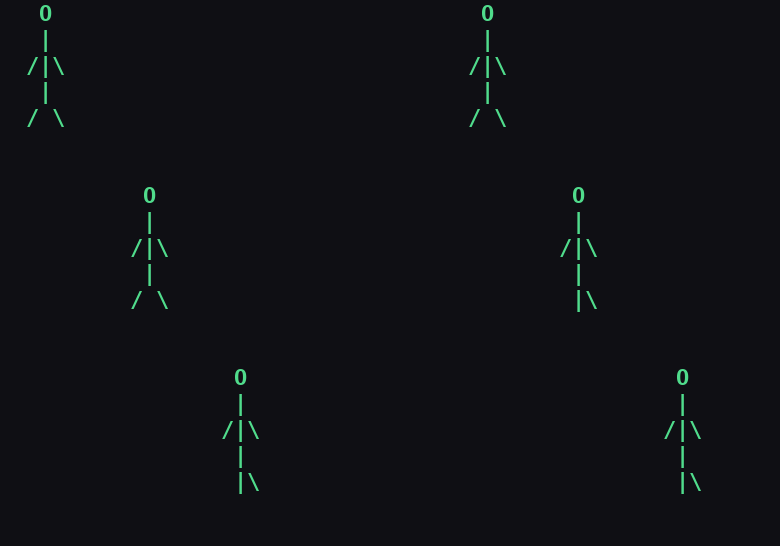
Every one of those frames is nothing but the loop above, answering "what goes at (i, j)" thirty times a row, seven rows a frame, twenty frames a walk cycle. That's the whole trick behind every animation you've ever watched. We just got much, much better at doing it fast.
Push The Same Idea Further
Here's the thing about that stick figure: it's the smallest possible version of this trick. The same three ingredients a grid, a rule per cell, a loop that redraws it don't stop scaling just because you stop coding. Put in more hours, add more rules, layer more shapes on top of each other, and the exact same nested-loop-plus-if pattern gets you here:
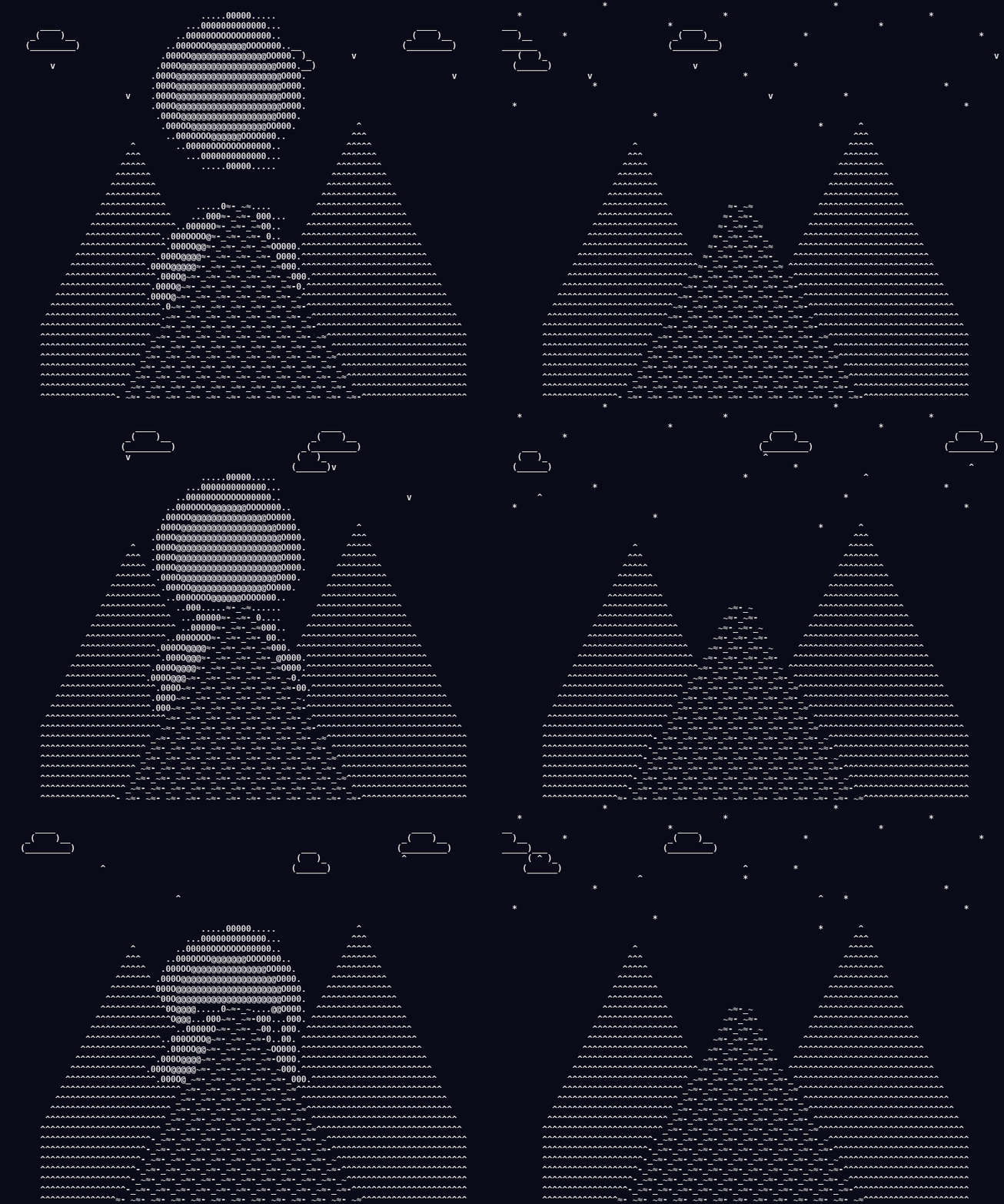
Nothing in that GIF is a new concept. It's the same (i, j) grid, the same if cascade, just with more layers stacked on it: a distance formula for the sun, a triangle formula for the mountains, a widening-bound formula for the river, a mirrored index for the reflection, a couple of small bitmaps for the clouds and birds. Every layer is something you already saw above. The only real difference between the stick figure and the sunset is how much patience you put into the if chain.
The full code for both, the walking stick figure and the sunset is up on my GitHub: https://github.com/rash-aad/ascii-pattern-animations. Clone it, run it, break it, add your own shapes to it. That's the fastest way to actually feel how far "just loops and ifs" can go.
Eco signing off